Login / Guest Portal
Training, tickets, licenses, and compliance proof

Certificate Tracking Software

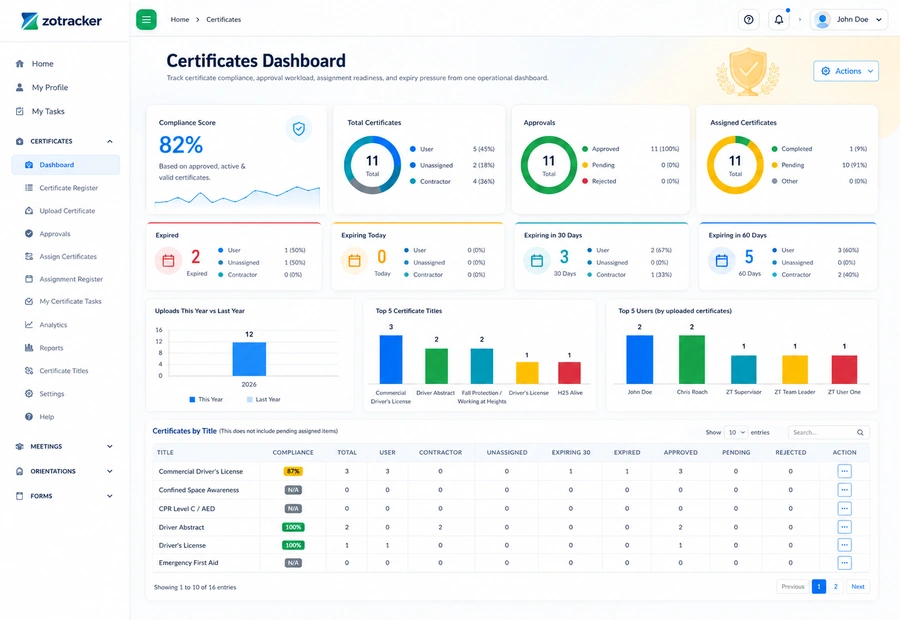
Track certificate records for employees, contractors, and unassigned inventory with expiry alerts, approvals, employee ID/QR quick access, bulk upload, backup ZIP exports, and retention history.

ZoTracker certificate tracking dashboard view
Start free Test certificates with real records and no credit card required.
Assign the work Give each record an owner, due date, status, and follow-up path.
Keep proof connected Keep files, notes, history, and reports attached to the workflow.
Scale when ready Add capacity when your team needs more users, storage, or reports.
What it helps you do

Certificates without spreadsheet chasing.

ZoTracker keeps the workflow practical for admins, supervisors, employees, contractors, project teams, operations teams, and any organization that needs traceable records.

Upload, update, assign, approve, and report on certificate records.

Use bulk upload for onboarding, renewals, and cleanup projects.

Download backup ZIP packages and preserve record history for audits.

Choose which certificate records appear through employee ID/QR quick-access links.

Typical workflow

How your team moves certificates from setup to proof.

  1. Create reusable certificate titles for training, permits, licenses, or tickets.
  2. Upload certificates individually or in batches.
  3. Assign missing requirements to employees, contractors, or unassigned records.
  4. Review submitted evidence, control QR visibility, and keep replacement history for audit review.
Common use cases
  • WHMIS, First Aid, Fall Protection, H2S, forklift, driver abstracts, trade tickets, and site-required credentials.
  • Prequalification checks before assigning people to jobs or client projects.
  • Field verification through employee ID cards and QR-linked certificate record access.
  • Audit exports when clients ask for proof of current compliance.
Workflow fit

What certificate tracking software should handle

A useful certificate tracker should manage more than a file and an expiry date. ZoTracker helps teams keep the requirement, owner, evidence, approval status, renewal pressure, and audit proof in the same workflow.

Expiry and renewal visibility

See which certificates are current, upcoming, expired, missing, or waiting for review before the gap becomes a project or audit issue.

Employee and contractor coverage

Track certificates for employees, contractors, and planning records so readiness is not split across separate spreadsheets.

Proof that stays attached

Keep uploaded files, replacement history, backup downloads, and reportable status connected to the certificate record.

Field-friendly verification

Use employee ID and QR quick-access workflows where supported so authorized field reviewers can reach selected certificate context faster.

Certificates in practice

See certificate tracking in a workflow your team can act on.

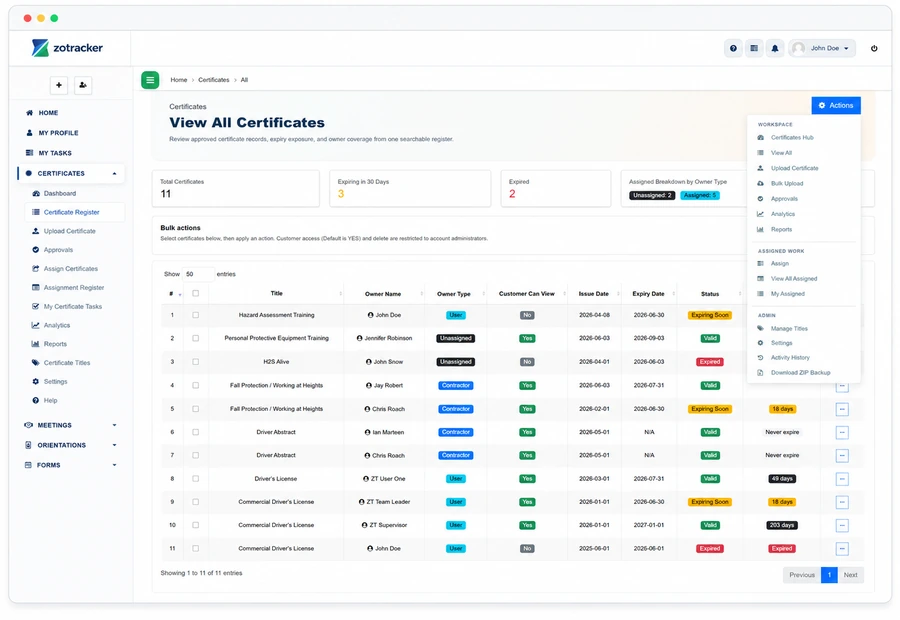
Track certificate records for employees, contractors, and unassigned inventory with expiry alerts, approvals, employee ID/QR quick access, bulk upload, backup ZIP exports, and retention history.

  • Upload, update, assign, approve, and report on certificate records.
  • Upload certificates individually or in batches.
  • WHMIS, First Aid, Fall Protection, H2S, forklift, driver abstracts, trade tickets, and site-required credentials.
ZoTracker Certificate Tracking Software product view
Connected records

Certificates works better when related work stays connected.

Use this workflow alongside Orientations, Forms, Incidents, Projects, Equipment, and reporting so your team can see the full context.

Certificates Orientations Forms Incidents Projects Equipment Employees Contractors Customers Meetings Documents Reports Notifications Access and Permissions My Tasks Technical Support
Common questions

Helpful answers before your team chooses a workflow.

Use these answers to understand product fit, setup expectations, and how this ZoTracker workflow supports day-to-day work.

Can ZoTracker replace a certificate expiry spreadsheet?

Yes. ZoTracker is designed to replace spreadsheet-based certificate lists with records that include owners, due dates, proof files, approvals, reminders, reports, and history.

Is there a free certificate tracking option?

Yes. Basic Free is a permanent starter plan for small teams that want to test certificate tracking with real records before upgrading.

Does certificate tracking connect to other workflows?

Yes. Certificates can connect with employees, contractors, reports, reminders, documents, projects, and employee ID/QR quick access where supported.

Keep evaluating

Related ZoTracker resources.

Use these pages to compare options, understand the workflow, and start with the permanent Basic Free plan.

Questions teams ask

Certificates FAQ

Yes. Assigned users can upload evidence where the certificate workflow allows self-service completion.

Yes. ZoTracker supports certificate downloads, backup ZIP packages, and history ZIP packages with permission checks.

Yes. Certificate workflows can control which records are visible through employee ID and QR quick-access links.

Certificate history and retention workflows help preserve replacement context for audit and review needs.

Yes. ZoTracker Basic Free gives small teams a permanent way to start tracking real certificate records with no credit card required.
Ready to try certificates?

Start certificates in Basic Free.

Use real records first, then upgrade when your team needs more capacity, reporting, storage, or rollout support.