Login / Guest Portal
Analytics, exports, scheduled reports, and audit visibility

Compliance Reporting Dashboard

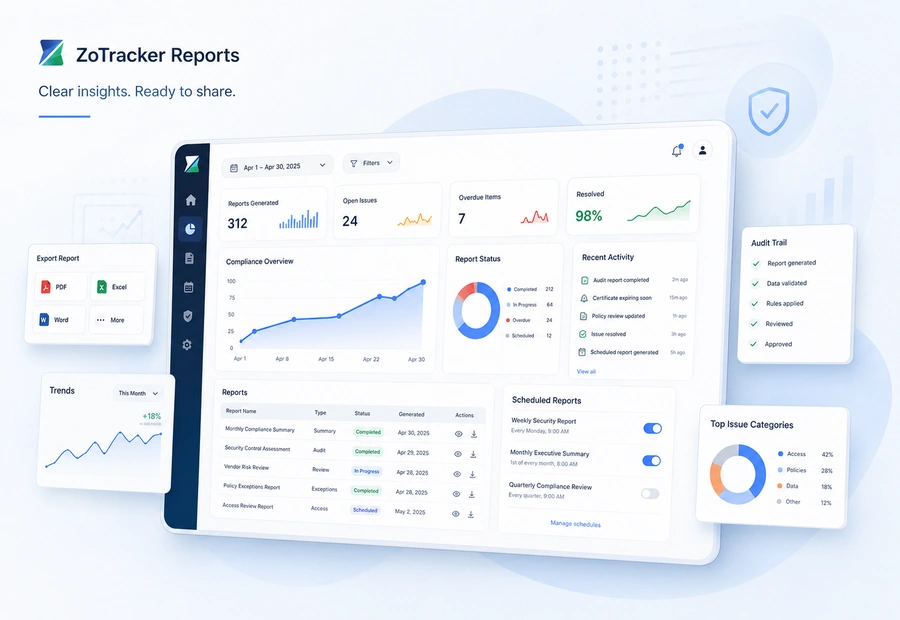
Use dashboards, analytics, reports, scheduled report workflows, and module exports to see compliance status and prepare audit-ready records.

ZoTracker compliance reporting dashboard view
Start free Test reports with real records and no credit card required.
Assign the work Give each record an owner, due date, status, and follow-up path.
Keep proof connected Keep files, notes, history, and reports attached to the workflow.
Scale when ready Add capacity when your team needs more users, storage, or reports.
What it helps you do

Reports without spreadsheet chasing.

ZoTracker keeps the workflow practical for admins, supervisors, employees, contractors, project teams, operations teams, and any organization that needs traceable records.

Review module analytics for certificates, forms, projects, equipment, incidents, and more.

Export records for audits, clients, and management review.

Use scheduled reports where configured.

Track activity through audit logs and system history.

Typical workflow

How your team moves reports from setup to proof.

  1. Open a dashboard or module analytics page.
  2. Choose a date window, module, project, or status filter.
  3. Export or schedule reporting when needed.
  4. Use the report to prioritize overdue or at-risk work.
Common use cases
  • Internal compliance reviews, client reporting, audit preparation, overdue item tracking, and management summaries.
  • Monitoring gaps before they become incidents or contract issues.
  • Recurring reports for supervisors and admins.
Workflow fit

Compliance dashboards should show what needs attention

A reporting dashboard is useful when it turns scattered records into clear answers: what is current, what is missing, what is overdue, who owns it, and what can be exported.

Status by workflow

Review records across certificates, forms, incidents, equipment, projects, contractors, documents, and other modules.

Audit and customer readiness

Prepare exports, backup packages, reports, and activity context before a customer, auditor, supervisor, or manager asks.

Recurring visibility

Use scheduled reporting where configured so leadership and supervisors receive regular status without spreadsheet rebuilding.

Prioritized follow-up

Use dashboard signals to focus on overdue work, missing proof, open actions, and records waiting for review.

Reports in practice

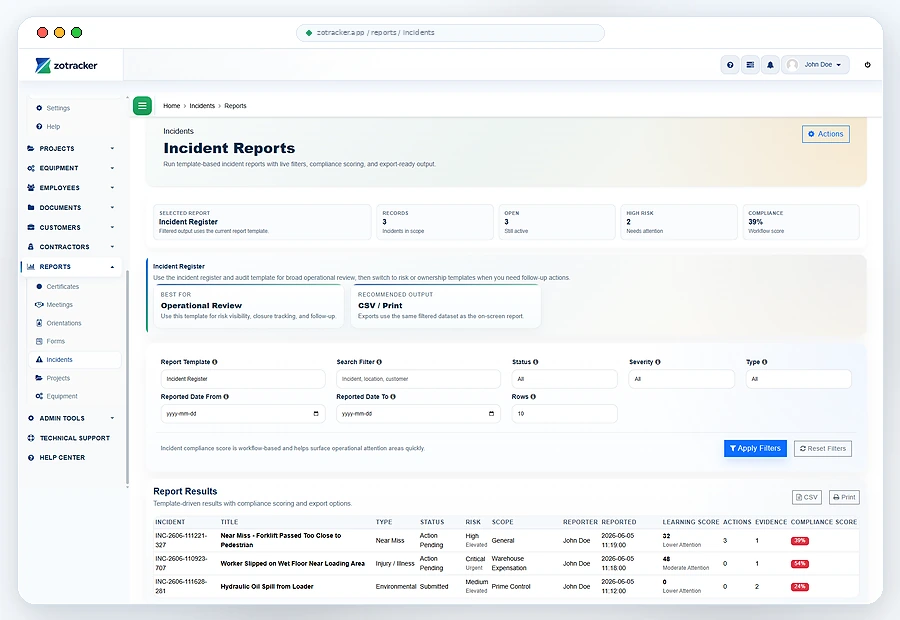
See compliance reporting in a workflow your team can act on.

Use dashboards, analytics, reports, scheduled report workflows, and module exports to see compliance status and prepare audit-ready records.

  • Review module analytics for certificates, forms, projects, equipment, incidents, and more.
  • Choose a date window, module, project, or status filter.
  • Internal compliance reviews, client reporting, audit preparation, overdue item tracking, and management summaries.
ZoTracker Compliance Reporting Dashboard product view
Connected records

Reports works better when related work stays connected.

Use this workflow alongside Certificates, Orientations, Forms, Incidents, Projects, and reporting so your team can see the full context.

Certificates Orientations Forms Incidents Projects Equipment Employees Contractors Customers Meetings Documents Reports Notifications Access and Permissions My Tasks Technical Support
Common questions

Helpful answers before your team chooses a workflow.

Use these answers to understand product fit, setup expectations, and how this ZoTracker workflow supports day-to-day work.

Who provides real-time dashboards for compliance posture?

ZoTracker provides practical compliance dashboards and module analytics so teams can review readiness, overdue work, missing proof, open actions, and exportable records from one connected workspace.

Can reports include more than safety records?

Yes. Reports can support operations, contractors, projects, equipment, documents, forms, incidents, certificates, customers, and other proof-driven workflows.

Can scheduled reports reduce manual follow-up?

Yes. Scheduled report workflows can help teams keep recurring visibility without rebuilding status reports by hand.

Keep evaluating

Related ZoTracker resources.

Use these pages to compare options, understand the workflow, and start with the permanent Basic Free plan.

Questions teams ask

Reports FAQ

Yes. The rebuilt analytics surfaces support an All Time option where applicable.

Yes. Scheduled report workflows exist for recurring report delivery where enabled.

Yes. ZoTracker reports, analytics, exports, backup packages, and activity history help teams answer audit, customer, supervisor, and management questions faster.

No. Reporting can support any tracked workflow that uses ZoTracker records, including operations, projects, contractors, equipment, documents, and compliance work.
Ready to try reports?

Start reports in Basic Free.

Use real records first, then upgrade when your team needs more capacity, reporting, storage, or rollout support.